
DIY teleprompter: build your own with a tablet or phone
A DIY teleprompter lets you read your script while looking straight into the lens. All it takes is a tablet or phone to show the words, a sheet of glass at 45 degrees to reflect them, a support to hold it steady and some black cloth.
This guide covers what to buy, how to put it together, why the text has to be flipped and how to make it easy to read. The steps work with any teleprompter software; where Voice Assist helps, we say so.
How a homemade teleprompter works
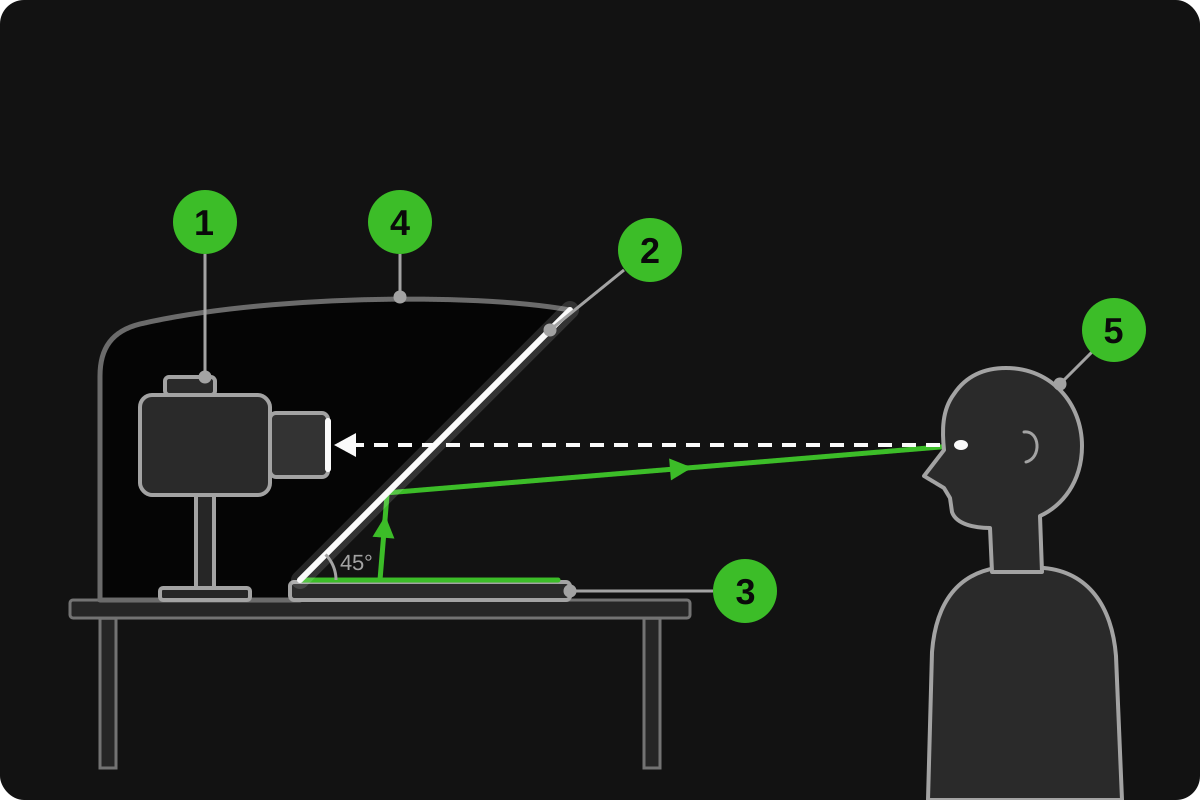
Every teleprompter, from a TV studio rig to a cardboard box, works the same way. A screen lies face up under the camera, and a sheet of glass leans at 45 degrees in front of the lens. The glass reflects the screen toward you, so the script appears right over the lens, while the camera looks through the glass from behind and sees only you.
That glass is often sold as a teleprompter mirror, but a real mirror would blind the camera. The glass has to reflect enough light for you to read and let enough through for the camera. A dark hood around the back blocks stray light, so the room doesn't show up as reflections in your shot.
What you need
You need two devices: one shows the script, the other films you. The simplest setup is to use your iPad or tablet as a teleprompter screen and film with your phone or camera. A phone can show the script too, for takes of any length: its screen is smaller, so use bigger text and shorter lines.
Next comes the glass, the part that matters most:
- Beam splitter glass. Made for teleprompters, with a reflective coating on one side. The usual 70/30 type lets about 70% of the light through to the camera and reflects about 30% toward you, so the text looks bright and the camera loses little light. It's also the priciest option.
- Picture frame glass. Cheap, flat and fine to start with. It reflects far less, so the text is fainter: you'll need full brightness and a darker room. Both surfaces reflect, which can cause a faint double image; thinner glass keeps the two copies closer together. Tape the edges.
- Clear acrylic (plexiglass). Light and shatterproof, the safest choice around kids and pets. It reflects about as little as plain glass, scratches easily, and a thin sheet can flex and make the text look wavy. Keep the protective film on until the end.
The rest costs little, and you probably have it already:
- A support that holds the glass at 45 degrees: a cardboard box cut at an angle, wooden wedges, or books and tape.
- Black cloth or cardboard for the hood. A dark T-shirt works in a pinch.
- A tripod or a stack of books to put the camera at eye level.
- A teleprompter app that can flip the text, because the reflection reverses it.
How big should the glass be? At least as wide as the screen, and about 1.4 times as long as the screen's other side, because at 45 degrees it covers that side on a slant. With the device lying sideways, glass from an 11 x 14 inch frame suits most 10- to 11-inch tablets, and a 5 x 7 usually suits a phone.
How to make a teleprompter, step by step
- Put the camera at eye level and frame your shot first.
- Lay the tablet flat, screen up, in front of the camera and centered on the lens, with its top edge pointing toward the camera.
- Mount the glass above the tablet at 45 degrees, bottom edge toward the camera and top edge leaning toward you. A square of paper folded corner to corner gives you the angle. On a beam splitter, the coated side faces down.
- Bring the lens close to the glass, centered behind the text, so the shot doesn't catch the glass edges.
- Drape the black cloth over the camera and the back of the glass, leaving your side open.
- Turn off auto-lock and notifications on the tablet: a sleeping screen ends the take, and notifications pop up in the glass, upside down.
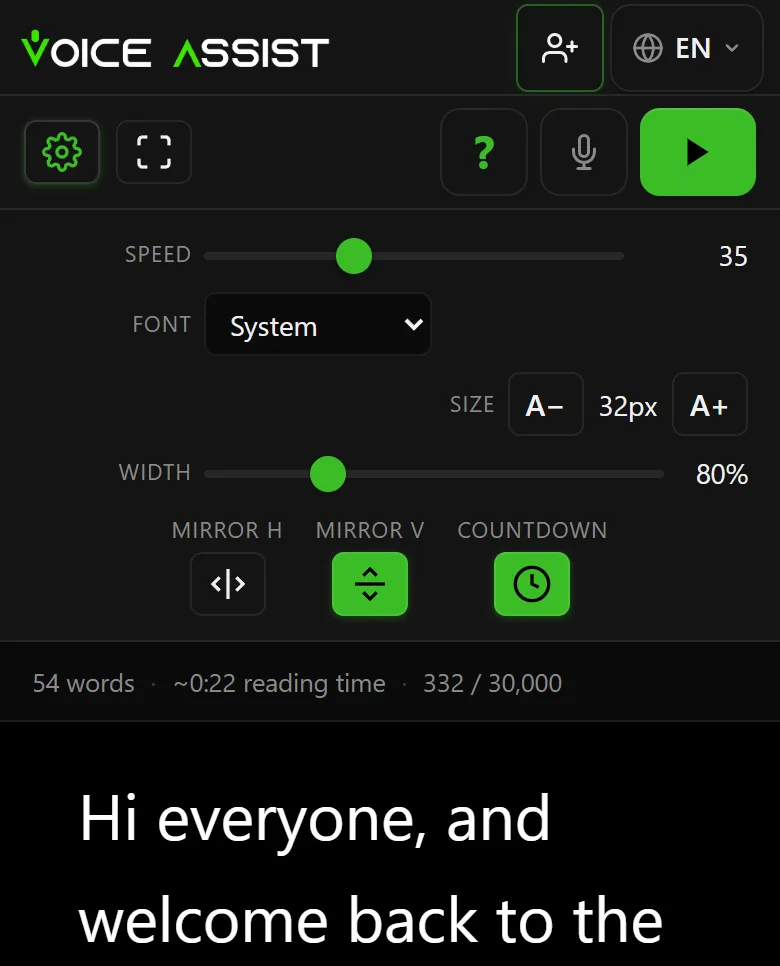
- Open your script, turn on the vertical mirror (Mirror V in Voice Assist) and go full screen.
- Sit in your spot. If the text still reads wrong, check which way the tablet faces (see below).
- Record a short test and check the shot for glass edges, glare, reflections and eyes that visibly track the lines.
Why the text has to be flipped, and how to do it
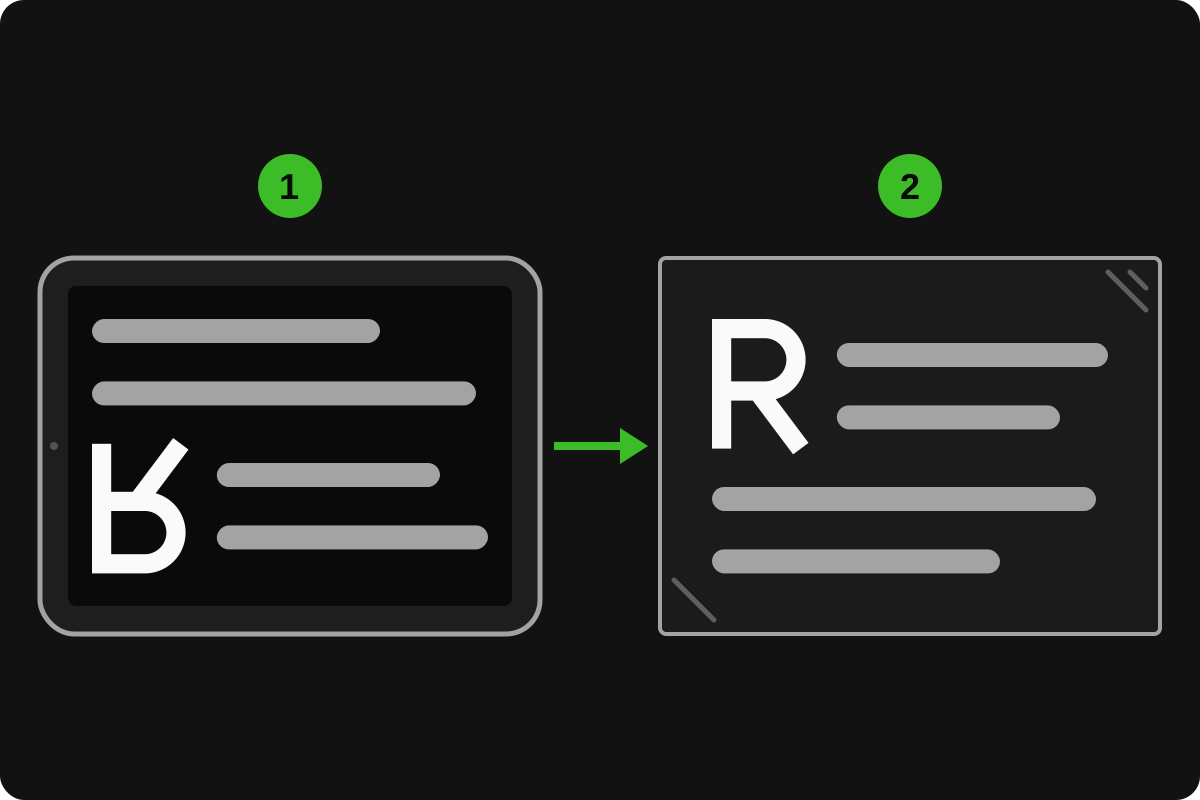
A reflection flips whatever it shows, so normal text comes out upside down or backwards in the glass. That’s why teleprompters flip the text on screen first: the glass flips it back.
Which flip you need depends on how the tablet lies. In the usual setup, with the top edge toward the camera, the glass turns the text upside down: flip it vertically and it reads right. If you lay the tablet the other way round, top edge toward you, you need the horizontal flip instead. With one sheet of glass you need one flip, never both.
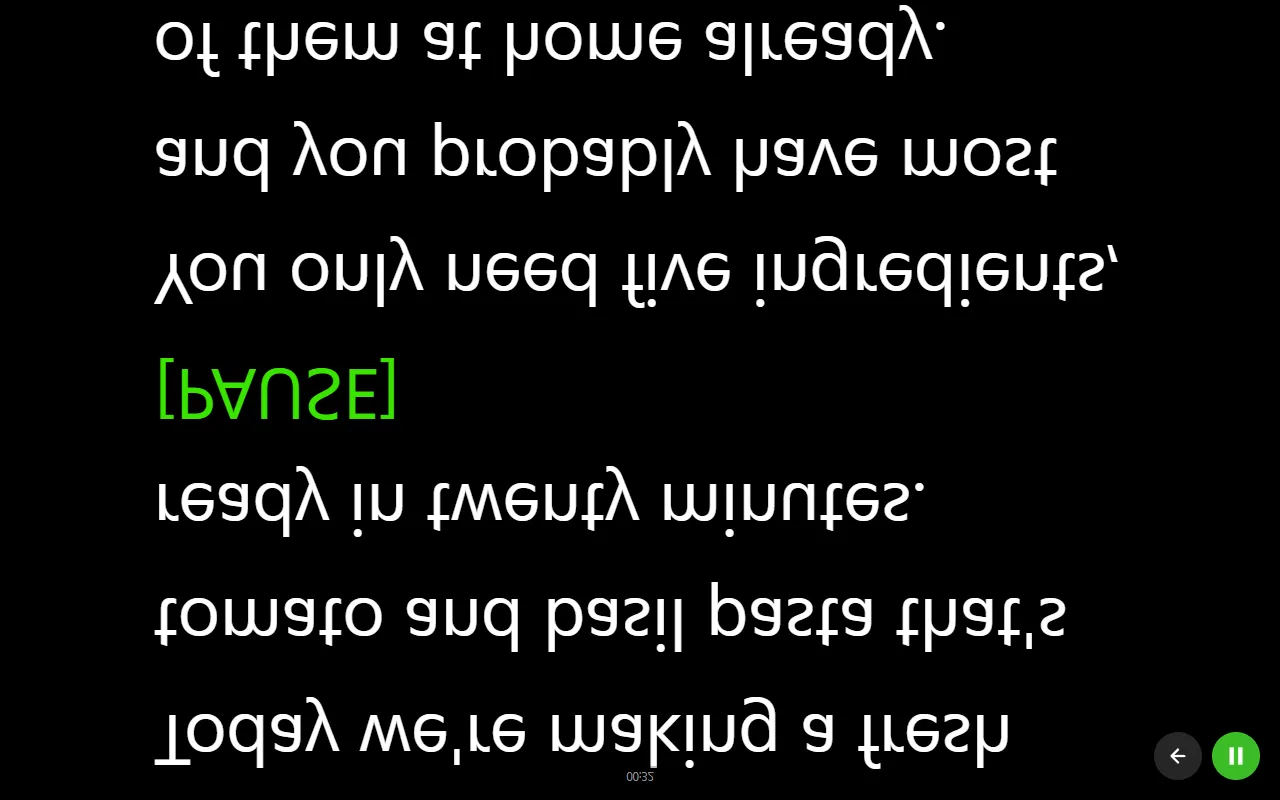
In Voice Assist, mirror mode has two switches, Mirror H and Mirror V, in the settings and in the reading screen's control bar, and it works with any glass. The countdown and the end-of-script message flip too. Each device remembers its own size, width and mirror settings, so the tablet stays set up for the glass while your laptop keeps its normal view.
Fine-tuning your DIY teleprompter
Text size and line length. Go bigger than seems necessary, then shorten the lines: long lines make your eyes sweep sideways, and the camera notices. Five to eight words per line is a good start. In Voice Assist, Size sets the text size and Width sets the column width.
Brightness. Plain glass and acrylic need full brightness; a beam splitter can take a little less. Turn off auto-brightness, or the tablet may dim itself under the hood. Light text on black works best, and it's what Voice Assist uses: black gives off almost no light, so the glass stays clear around the words.
Distance. Sit close and your eyes travel farther across each line; sit farther back and they barely move, but the text has to grow. Find the spot where you can read without squinting, then mark it on the floor with tape.
Reflections and room light. Keep lamps and windows from shining on the screen or the glass, aim your lights at yourself and seal the hood: a glow or ghost image in the shot means light is leaking in behind the glass. Wipe the glass too; a smudge in front of the lens softens the picture.
Who scrolls the text?
Once the rig works, something has to move the text. There are three options.
A fixed speed. The text crawls up at a pace you set in advance. No helper needed, but you have to keep up: pause for effect and the text keeps going. Read a paragraph aloud first and tune the speed to match. In Voice Assist, auto-scroll is free forever and needs no account.
A remote. A helper, or you with a remote in hand, controls the text as you go. In Voice Assist, your phone can be the remote for the tablet: sign in to the same account on both, tap the sync button on the tablet, then on the phone, and choose Remote control. The phone gets big buttons to start, pause, restart and end the reading, plus a speed slider. Sync is free with an account and links up to three devices.
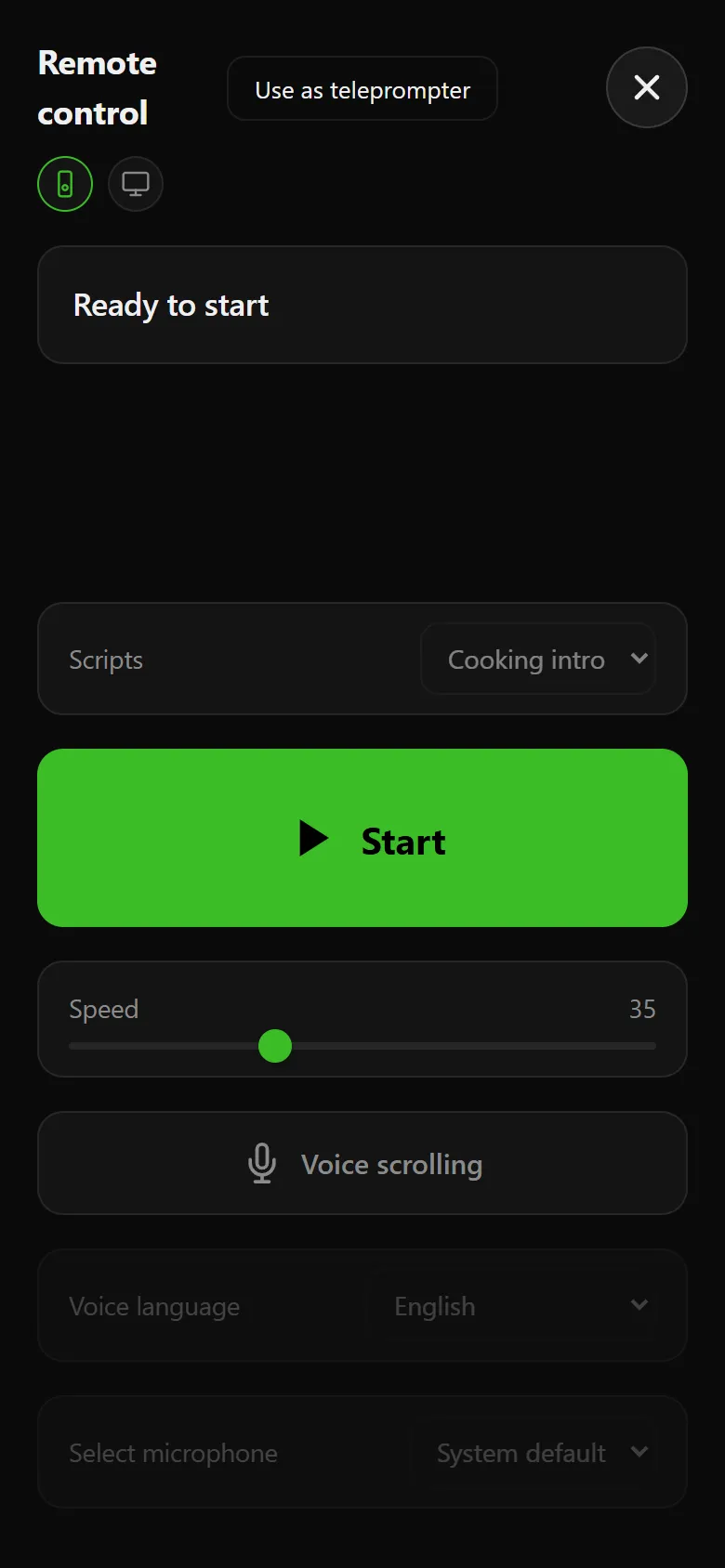
Your voice. No operator, no pace to match: the text follows what you say. Voice Assist listens and brings the text to the line you're reading. Speed up and it speeds up, stop and it waits, skip or ad-lib and it finds its place again. Cues in square brackets, like [PAUSE], appear on screen but don't affect scrolling. Started from the phone remote, voice uses the phone's microphone, which can sit close to you. It works in 10 languages.
You get 10 free minutes of voice scrolling when you sign up, no credit card needed. After that, voice uses credits (1 credit = 1 minute), with no subscription, and credits never expire.
No glass? Put the script under your webcam
For video calls, online lessons or talking-head videos on a laptop, you can skip the glass. Put the teleprompter window right below the webcam, make it narrow and keep the line you're reading near the top, so your gaze stays close to the lens. In voice mode, Voice Assist holds that line in the upper third of the screen.
Our guide on how to use a teleprompter covers the reading itself: sounding natural and keeping eye contact, with or without glass.
Common mistakes
- Glass that isn't at 45 degrees. The text leans and drifts away from the lens.
- Both mirror switches on. One sheet of glass needs exactly one flip.
- No hood. Light from behind washes out the text and puts reflections in the shot.
- Small text on long lines. Your eyes scan from side to side, and it shows.
Frequently asked questions
Can I use a phone instead of a tablet?
Yes, and for sessions of any length. The screen is smaller, so fewer large words fit on each line: shorten the lines and sit a little closer. On iPhone, Safari can't show a web page full screen, but if you add Voice Assist to your Home Screen, it opens as a full-screen app.
Do I need special glass?
No. Picture frame glass or clear acrylic works, just with fainter text; a beam splitter is brighter and cleaner but costs more. What won't work is a real mirror: the camera can't see through it.
Why is my text upside down or backwards?
Because the glass reflects it. Turn on your teleprompter’s mirror setting: vertical when the tablet’s top edge points toward the camera, as in this guide, horizontal when it points toward you.
Can one phone be both the camera and the prompter?
Not with glass, since the phone filming you can't also lie under it. Without glass, yes: Voice Assist can record video from the front camera while the script scrolls on the same screen. Recording uses credits like voice scrolling, and the 10 free minutes you get at signup cover both.